
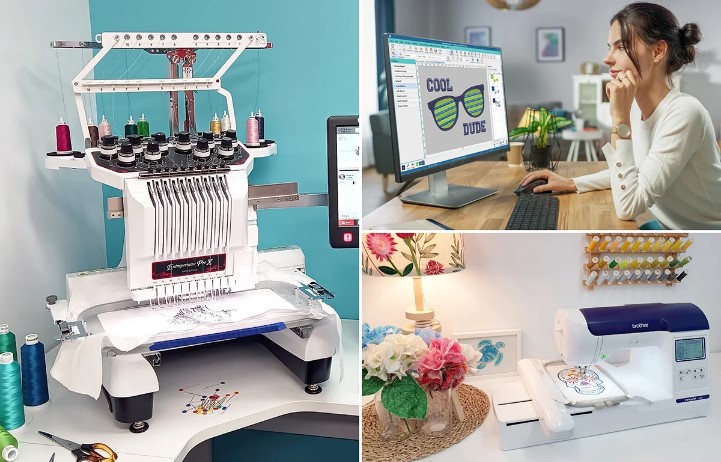
If you want your logos to stitch perfectly on embroidery machines, it’s important to Convert Logo to PES File Format. PES files are compatible with Brother and Babylock embroidery machines and carry all the stitch information needed for accurate embroidery. When done correctly, your logo will appear sharp, clean, and professional on fabric, whether it’s on shirts, hats, or jackets. Without proper conversion, even the best-designed logos can end up distorted or uneven during stitching.
In this guide, we’ll walk you through simple methods to create PES files from logo designs, tips for improving stitch accuracy, and ways to avoid common mistakes. By the end, you’ll know exactly how to get clean and professional embroidery results.
What Is a PES File?
A PES file is a type of embroidery file format mainly used for Brother and Babylock machines. Unlike regular images, embroidery machines do not understand pixels—they require stitch instructions. That’s where PES files come in.
Why PES Files Matter
- Stitch Paths: Tells the machine where each stitch goes.
- Thread Colors: Controls when and where to change thread colors.
- Stitch Density: Prevents gaps or overlaps.
- Trims and Direction: Maintains smooth edges and professional-looking embroidery.
A properly prepared PES file ensures your logo stitches accurately, avoiding messy results.
Preparing Your Logo for PES Conversion
Before converting a logo into a PES file, proper preparation is key.
Use High-Quality Artwork
- Vector files like AI or EPS work best.
- High-resolution JPG or PNG can also work if vectors are unavailable.
- Avoid blurry or low-quality images—they lead to poor stitch results.
Simplify the Design
- Remove unnecessary small details that won’t stitch well.
- Simplify thin lines or tiny text to prevent distortion.
Decide the Final Size
- Determine the embroidery size in advance.
- Ensure proportions match the product type, whether it’s a cap, shirt, or bag.
Methods to Convert Logo to PES File Format
There are a few ways to convert your logo into a PES file. The right method depends on your design’s complexity and your experience level.
1. Automatic PES Conversion Tools
These tools allow you to upload a logo and quickly get a PES file. They are fast and convenient for simple logos.
Pros:
- Quick and easy
- Good for basic shapes and designs
Cons:
- Small details may be lost
2. Manual Digitizing
Manual digitizing is the most reliable way to get professional results.
Steps:
- Import the logo into digitizing software.
- Trace the design and assign stitch types (satin, fill, running stitches).
- Set stitch density and direction according to fabric type.
- Add underlay stitches to stabilize the fabric.
- Export the design as a PES file.
Benefits:
- Preserves fine details and text
- Reduces thread breaks
- Produces clean, professional embroidery
3. Professional Conversion Services
Hiring experts saves time and ensures high-quality results. Professionals manually convert logos, test stitch them, and adjust for accuracy.
Advantages:
- Perfect for complex, multi-color logos
- Reduces errors and material waste
- Provides consistent stitch quality for multiple items
Tips for Accurate PES File Creation
Proper preparation and technique make all the difference.
Test Stitch Your Design
Always do a small sample stitch before mass production. It helps catch any issues early.
Adjust for Fabric Type
- Soft fabrics require lighter stitch density.
- Thick fabrics need stronger underlay and longer stitches.
Keep Text Readable
- Avoid fonts that are too thin.
- Adjust size or simplify letters for clarity.
Avoid Overlapping Stitches
Too many stitches in the same area can make embroidery stiff and uneven. Proper planning keeps stitches smooth and clean.
Common Mistakes to Avoid
When converting logos, be aware of these common pitfalls:
- Using low-resolution artwork
- Ignoring fabric type and stitch density
- Skipping test stitching
- Overcomplicating small details
Avoiding these mistakes ensures your PES file produces professional results every time.
Benefits of Professional PES Conversion
Professional PES file conversion saves time and reduces stress.
Consistent Quality
Every stitch-out matches the original design perfectly.
Reduced Material Waste
Proper files prevent wasted thread and fabric caused by errors.
Efficient Production
Clean files reduce re-stitching and allow faster completion of multiple projects.
Final Thoughts
Converting your logo into a PES file doesn’t have to be complicated. With proper preparation, careful digitizing, and attention to stitch details, you can achieve clean, professional embroidery on any fabric. A reliable PES file ensures smooth machine operation, crisp details, and vibrant colors every time.
For businesses and creators who need accurate, professional PES file creation, Digitizing Buddy provides expert services that transform logos into machine-ready designs with perfect stitch results.